PixelPhone PRO v3.1.8 Apk

High application speed, stylish design, convenient and customizable interface. Feel the difference!
CONTACTS
• Intelligent search through all contacts fields
• Sorting and display of contact list (Last First, First Last)
• Display of contacts in alphabetical groups
• Quick browsing of contacts using an ABC scroll bar
• Display of contact’s photo, phone number and company name

FAVORITES
• Quick and easy arrangement of favorite contacts into groups
• Smooth browsing of contacts in a group or browsing between the groups (up-down and left-right)
• Various ways of icon customization
• Favorite action for any contact (call, message, e-mail, address, …)
• Classical or widescreen wallpapers
PHONE
• Quick and configurable smart T9 search through all fields in contacts and call history
• Support of T9 search using 2 languages simultaneously
• Customizable keypad size (small, medium and large)
• Speed dial
• Gestures (hide keypad, clear filter, undo filter)
CALL HISTORY
• Sorting by date
• Sorting by contacts
• Call history limitation (3/7/14/28 days, сomplete)
• Filtering (missed calls, all calls)
• Displaying date, duration and type of call
CONTACT CARD
• Assignment of HD photo for the contact
• Display of all contact’s fields, grouped into categories (phone, internet, address, …)
• Quick switching between contact’s information and call history (lower panel)
• Creating, editing, deleting and sending contact’s card
• Clipboard support
PIXELPHONE
• High speed. Quick launch. Smooth animation and scrolling.
• Stylish design. All interface elements are designed in classical colors and carefully drawn for each device.
• Convenient interface. Despite the application’s user friendliness, it has lots of interesting features.
• Personalization. Flexible configuration of application’s interface and work according to your preferences.
• Support and development. The application is constantly updated with the consideration of users’ requests.
Configure PixelPhone as you like! Select your favorite background images, assign photos to contacts and you’ll experience extra pleasure calling or even just launching the application.

Extended Controls v6.0.1 Apk

Extended controls is THE MUST HAVE APP for every Android user.
The application provides highly customizable widget with more than 30 controls.
Extended Controls provides user-friendly graphic interface and a easy configuration manager.
With its features user can customize his widgets and he can beautify your fantastic Android smartphone.
Extended Controls improves batterylife using an innovative feature called “Battery saver”. It’s only app on Play Store that do this!
Features:
- Custom backgrounds (from your gallery or download a set of backgrounds from the web);
- Widgets transparency;
- A lot of different icons;
- Edit existing widgets;
- Direct Home shortcuts;
- Customizable colors & labels;
- On/Off dividers;
- All tablets supported;
- Different widgets size (over 10 toggle for any single widget);
- Different indicator type (standard or circular)
- System Info Widget (RAM, CPU, Network, ext-memory, etc.)
- Notification Widget (like Samsung Galaxy S3 and S4)

Advanced features:
- Widgets sliders with double arrow, to beautify your home screen;
- Widgets controller on App Drawer (Extended Controls -> Widget option);
- Active widgets in notification bar;
- Stack Widgets list;
- Widgets in notification bar;
- Possibility to remove widgets size from android menu;
- Disable static indicator;
- Widget preview of your widget on configuration activity;
- Share your widgets with main social networks (Facebook, Twitter, Google+, etc.)
Profiles mode:
- Save your widgets and load it whenever you want!!!!
As we know Android provides a widget that allows you to enable or disable these settings: WiFi,Bluetooth,GPS,Sync,Brightness.
With Extended Controls, Android Power Widget can be improved allowing users to add main settings:
- 2G-3G
- 4G (WiMAX only for EVO)
- APN (Rename APN, Direct Mode or Settings Shortcut)
- Wifi (with indicator label)
- Bluetooth
- Brightness (High customization, with custom seekbar, label percentage, native mode)
- GPS
- Auto Sync
- Auto Rotate
- Fly Mode
- SD Scanner
- NFC
- Silent Mode
- Vibration Mode
- Timeout
- Stay Awake toggle
- Flashlight (Torch) available on (Sony Ericsson X10mini, Sony Ericsson X10, Motorola DroidX, Motorola Droid, Verizon, Mobile, Nexus S, Galaxy Ace, Fascinate, LG Optimus, Atrix, Arc, Samsung Galaxy S2, Motorola Photon, HTC One, Sony Xperia Z, Sony Xperia Z1 Galaxy Nexus, Nexus 4, Nexus 5, Motorola X, Nexus 7, Nexus 10,Galaxy Tab 3, Motorola G, Samsung Galaxy S4, Samsung Galaxy Note III and others)
- Mount USB
- AlwaysOn feature
- AutoLock
- Reboot (only for root users!! bootloader, normal or fastboot, confirm dialog)
- Battery
- Locale
- Hotspot Wifi
- USB Tether
- LockPattern
- AudioManager
- Lock Screen (turn your screen off)
- Direct Shortcut app (All activities or applications)
- Haptic feedback
- Volume manager (All volumes controls)
- Shutdown (Only for root users)
- Contact direct call
- System info (RAM, CPU, memory usage, SDcard free memory)

Titanium Backup Pro v6.1.5.1 Apk

☆Needs ROOT, Android 1.5-4.4+ (ARM,x86,MIPS)
Titanium Backup is the most powerful backup tool on Android, and then some.
You can backup, restore, freeze (with Pro) your apps + data + Market links. This includes all protected apps & system apps, plus external data on your SD card. You can do 0-click batch & scheduled backups. Backups will operate without closing any apps (with Pro). You can move any app (or app data) to/from the SD card. You can browse any app’s data and even query the Market to see detailed information about the app.
Also see the paid PRO key which adds EVEN MORE awesome features such as:
[✔] 0-click batch restores
[✔] Keep multiple backups per app
[✔] Backup/restore SMS,MMS,calls,bookmarks,Wi-Fi AP as XML
[✔] Multi-user app data
[✔] Apps freezer
[✔] Sync to/from Dropbox (manual/scheduled)
[✔] Sync to/from Box (manual/scheduled)
[✔] Sync to/from Google Drive (manual/scheduled)
[✔] TB Web Server: download/upload your backups as a single ZIP on your computer
[✔] Convert user apps <=> system apps
[✔] Integrate system app updates into ROM
[✔] Encryption
[✔] Market Doctor (relink apps to Market)
[✔] “Destroy all Market links” feature
[✔] Hypershell speed
[✔] Backup apps without closing them!
[✔] Create your own update.zip containing apps+data!
[✔] Restore individual apps+data from non-root ADB backups!
[✔] Restore individual apps+data from CWM backups!
[✔] Restore individual apps+data from TWRP backups!
[✔] Market “auto updating” manager
[✔] Dalvik cache cleaner
[✔] Integrate Dalvik cache system elements into ROM
[✔] Unlimited schedules
[✔] Load/Save a Filter and use it in Widgets/Schedules
[✔] Change the device’s Android ID, restore it from a backup or after a factory reset
[✔] Protect backup against deletion
[✔] Send backup (to e-mail/cloud) and import it in 1 click
[✔] Backup→Verify→Un-install an app in one shot
[✔] Freeze/defrost/launch apps in a single click
[✔] CSV export any app DB (e-mail or Google Docs)
[✔] Convert app data to/from fast WAL format
[✔] WAY MORE!
What’s New
• Fixed FC when clicking within the app list on some platforms.
• This is a bugfix release. Have a look at the changes in 6.1.5 too!


Doomsday Preppers Mod (Unlimited Money) v121.0.0 APK


Description:

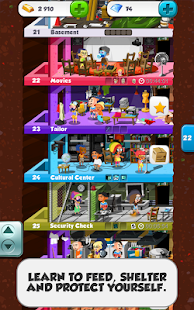
Based on the popular National Geographic Channel TV show by the same name, Doomsday Preppers challenges you to prepare for a new (and even more fabulous) life below the ground. Design a multi-level dream bunker complete with everything you need for post-apocalyptic bliss, from a gym to a greenhouse to a disco bar! Flush out your subterranean palace one floor at a time while measuring and improving your survival skills along the way, so that you can extend your underground lifespan – and keep on building!

Features:

  • ∙ 140 floors to build – how deep will you go?
  • ∙ Six types of floors: Shelter, Security, Food and Water, Science, Workshop and Recreation
  • ∙ Over 315 products to prep and store
  • ∙ Over 150 male and female customizable avatars to choose from
  • ∙ Regular game updates to keep you plotting and planning
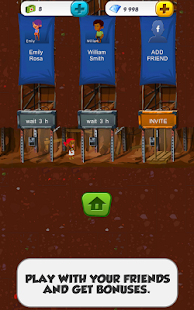
  • ∙ Play with other preppers, including your Facebook friends.

Screenshots:

Doomsday Preppers™ - screenshot thumbnailDoomsday Preppers™ - screenshot thumbnailDoomsday Preppers™ - screenshot thumbnail

Instructions:

  1. Download
  2. Extract If Downloaded File Is Compressed (RAR or ZIP)
  3. Install APK
  4. Put data on Sdcard/android/obb/here
  5. Launch the App

Buy it from google play